How do I export my articles from Medium and move them to my own domain?
Download your Medium data archive, drop the ZIP into the VeloCMS importer, and your whole catalog lives on a domain you actually own.
To export your Medium articles and move them to your own domain on VeloCMS, you just need to download your account's data archive from Medium's settings and drop that ZIP file straight into your VeloCMS dashboard. It only takes a couple of clicks to migrate your entire catalog to a platform you actually own.
Read the full transcript
Medium's a lovely place to write, and a frustrating place to own anything — your essays live on their domain, behind their paywall, under their rules. So let's move a real Medium archive onto its own domain, where the work is finally yours. It's easier than you'd think.
First, grab your content from Medium. In Medium's settings there's a "Download your information" option that emails you a ZIP of every article as an HTML file. That single ZIP is everything you need to bring across — no copy-pasting essays one by one.
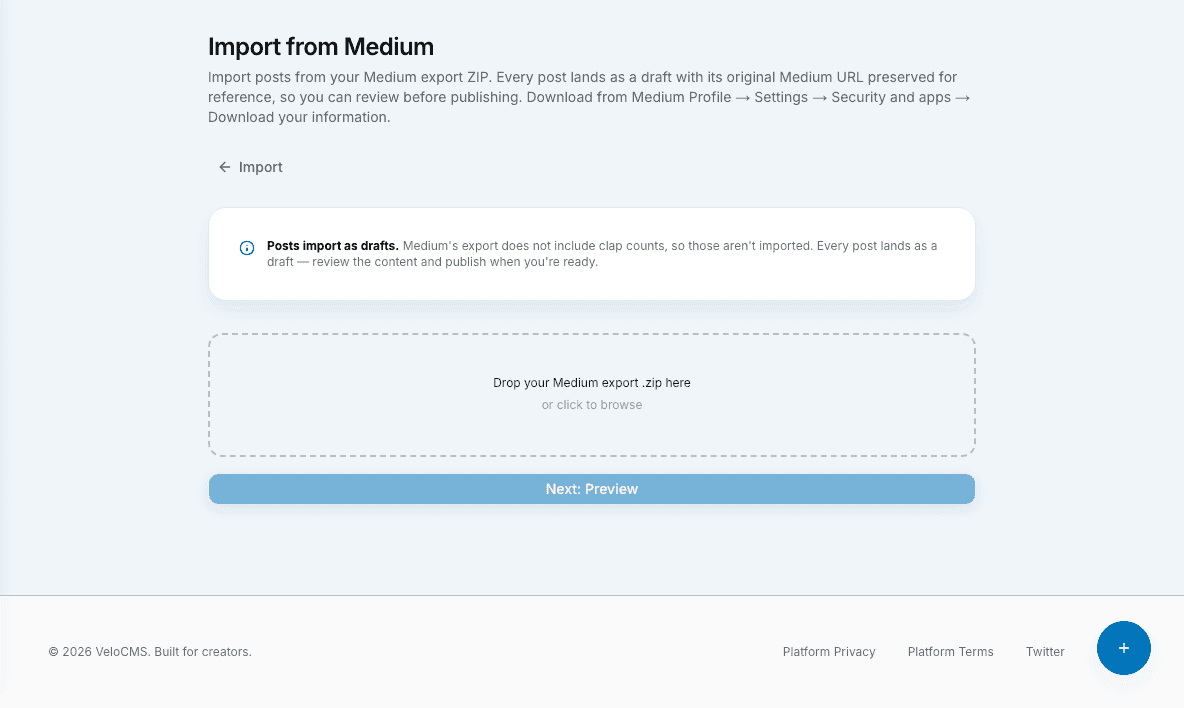
Now the VeloCMS side. Simone opens Import, picks Medium, and drops that ZIP onto the upload area. That's the whole action — one file, one screen. From here the wizard takes over and reads the archive for her.
Before anything's created, the wizard shows you the picture — how many articles it found and how many images. One honest heads-up it flags here: Medium exports don't include member-only paywalled posts, so those won't come through. Everything public does.
Hit import and it runs — your articles arrive as real posts, headings, images, and formatting intact, and you can watch every essay land as the progress bar fills. Here's the whole archive of The Margin Notes, sitting in Simone's own dashboard now.
And now the whole reason we did this — your own domain. Simone connects marginnotes-dot-com right in the settings, adds the DNS records it shows her, and her essays are live at her address. Not medium-dot-com-slash-her-name. Hers.
Your Medium archive, on your own domain, finally yours. Make the move and try it free for fourteen days at velocms dot org.
Where exactly do I find the export button on Medium?
Finding the export option can feel a bit like a scavenger hunt if you don't know exactly where to look. Head over to Medium and click your profile picture tucked up in the top right corner. From the drop-down menu, tap into your settings. You'll want to scroll past all the profile customization stuff until you hit the account security area. Keep scrolling down to the very bottom of that page. You'll spot a button labeled "Download your information." Give that a click. Medium will bundle up all your hard work — drafts, published posts, and even your claps — into a single ZIP file and fire off an email to you when it's ready. Don't worry if the email doesn't show up instantly (especially if you've got a massive backlog of essays!). Grab a coffee. It usually lands in your inbox within a few minutes.
How do I bring that downloaded content into VeloCMS?
Once you've got that ZIP file sitting on your hard drive, the heavy lifting is completely done. Now it's time to let VeloCMS work its magic. Log into your VeloCMS admin panel — you'll probably notice right away how snappy the Next.js and PocketBase architecture feels compared to wrestling with a bloated WordPress setup. Navigate over to the imports section in your dashboard. You literally just drag and drop that untouched Medium ZIP file into the upload zone. VeloCMS unpacks the archive behind the scenes, reading the raw HTML files Medium gives you and cleanly converting them into native posts. Since our AI-first system handles the formatting on the fly, your old articles will instantly match your new domain's sleek design without you having to mess around with weird spacing issues or broken image links.
What happens to my old links and SEO rankings?
This is usually the part that keeps writers up at night. Walking away from Medium's built-in audience is scary enough without worrying about tanking your Google rankings. To save your SEO, here is a highly specific, actionable tip: before you hit publish on your newly imported VeloCMS posts, go back to your original Medium articles and set up canonical links pointing to your new domain. Medium hides this deep in the "Advanced Settings" of each story. By pasting your new VeloCMS URL into that canonical link field, you tell search engines that your new website is the original home for that content. This safely passes the SEO juice over to a platform you completely control. You get to keep your hard-earned organic traffic while finally saying goodbye to those annoying paywalls that lock your readers out.
Taking complete ownership of your writing is a huge step, but getting your content out of a walled garden shouldn't be a technical nightmare. Now that your words are living on a lightning-fast, secure setup that actually respects your wallet, you can get back to doing what you do best. Happy writing, and welcome to your new home on the web.
Run a free technical SEO, performance, and migration-readiness audit — no signup required.Audit my site