Migrating from WordPress to VeloCMS
Export, transform, import — a complete playbook for moving years of content without losing SEO rankings.
Migrating from WordPress does not have to be a weekend-ruining project. Here is the playbook we use internally — it preserves post dates, URLs, categories, and (critically) your existing SEO rankings.
1. Export from WordPress
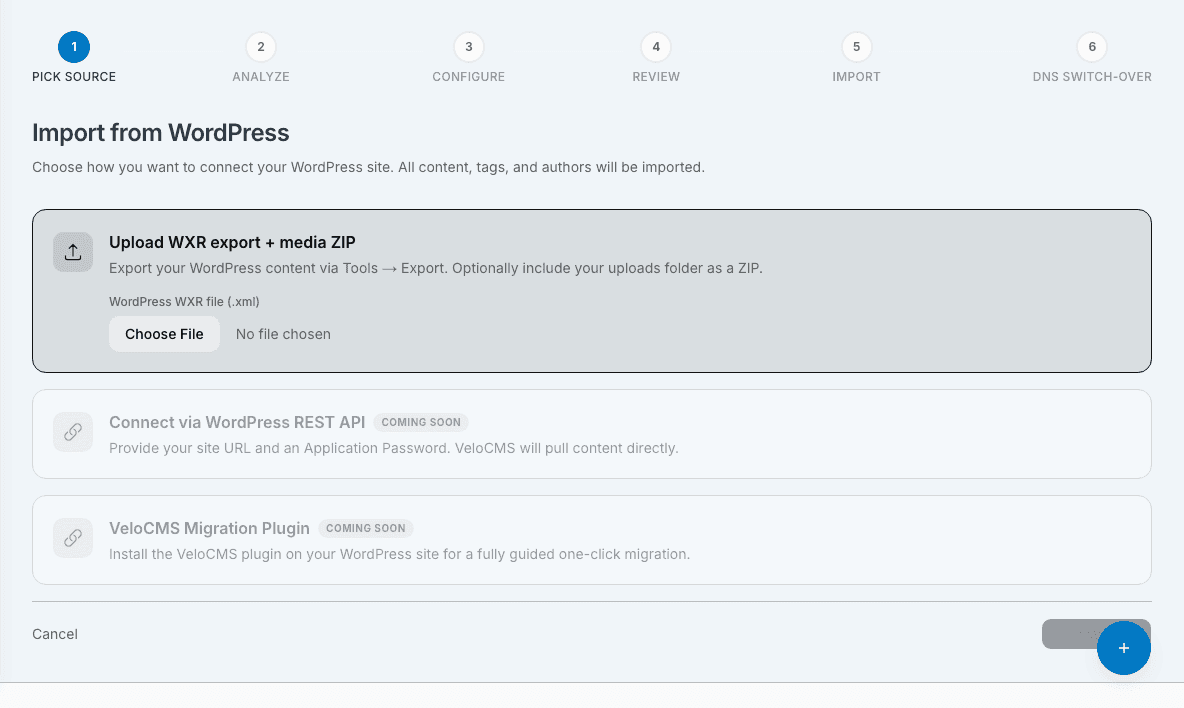
In your WordPress admin, go to Tools → Export and pick All content. You get a single WXR XML file with posts, pages, comments, categories, tags, authors, and media references. VeloCMS imports the posts, pages, categories, tags and media from it. Comments, WordPress user accounts, custom post types and plugin data (WooCommerce, ACF) are not imported, and each post keeps its author's name as plain text.
2. Keep your WordPress site online
You do not need to download or upload your media folder. During the import, VeloCMS fetches every image and file your posts use straight from your live WordPress site and stores it on Cloudflare R2, so keep the site online until the import finishes. A file that cannot be fetched keeps pointing at its old WordPress address.
3. Import into VeloCMS
Go to Admin → Migrate Content, choose WordPress, and upload the WXR file (or connect your live site's public REST API instead). The size limit is 100 MB. We parse the content, upload every image to Cloudflare R2, rewrite image URLs in post content, and create matching posts, pages, categories, and tags. The wizard shows your counts before you commit, and the final summary reports how many items were skipped (for example custom post types).
4. Set up 301 redirects
This is the step everyone forgets. WordPress URLs like /2023/07/my-post/ will 404 on VeloCMS unless you tell Google the content moved. The import writes the redirects for you. Every published post and page gets a 301 from its real old address, read from your export, to its new one: posts land at /blog/your-slug and pages at /p/your-slug. Drafts and private items get none. If one of your own posts already uses a slug, the imported post is saved as your-slug-2 and its redirect points there.
5. Submit a new sitemap
After import, fetch your new /sitemap.xml and submit it in Google Search Console. Rankings should stay steady or improve — VeloCMS serves server-rendered, cached pages, which supports the page-experience signals search engines look at.
Average migration time from export to live on VeloCMS: under 30 minutes for blogs with fewer than 500 posts.
Run a free technical SEO, performance, and migration-readiness audit — no signup required.Audit my site