Calendly
Paste your Calendly link into a block and visitors book a call on your page
What it does
The Calendly plugin gives the page builder a Calendly Booking block. Add the block to a page, paste your public Calendly scheduling link, and Calendly's own inline widget appears there so visitors can pick a time without leaving your site. You can hide Calendly's event name and description inside the widget for a tidier look and set the embed height. Until a valid link is entered, the block shows a plain note explaining what to add instead of an empty box. The block needs no connection to your Calendly account, and no plugin hook runs. The plugin exists to unlock this block for your site.
Who it's for
Consultants, coaches, freelancers and small agencies who already take bookings through Calendly and want a call-booking section on their own pages. It suits anyone who can copy a link from their Calendly account. It is not a calendar of its own: availability, reminders and calendar syncing stay inside Calendly, which handles the actual booking.
How it works
Install the plugin from the marketplace. The Calendly Booking block is offered in the page builder only for sites that have installed it.
Open a page in the page builder and add the Calendly Booking block from the conversion section of the block palette.
In the block settings, paste your public Calendly link, for example https://calendly.com/your-username/30min. Only calendly.com addresses are accepted.
Optionally switch on Hide event details header, and adjust the embed height. It starts at 700 pixels and can be set between 400 and 1200.
Publish the page. The page loads Calendly's widget script after it becomes interactive and turns the placeholder into the booking widget.
Settings you configure
- Calendly Scheduling URL
- Your public Calendly link, set per block in the page builder. No account connection is needed for the block to work.
- Hide event details header
- Hides Calendly's own event name and description inside the widget for a cleaner embed. Off by default.
- Embed Height (px)
- How tall the widget is, from 400 to 1200 pixels. The default is 700.
What it can access
The plugin reads nothing from your site's posts, members or orders and runs no hooks. The block stores only the link, the height and the header choice you type into it. On the public page, the visitor's browser loads Calendly's widget script and the booking widget directly from Calendly, so Calendly handles whatever the visitor enters when booking, under its own privacy terms.
Permissions
- Connect your Calendly account (optional)
- Read your event types to populate a dropdown in the admin panel
- The scheduling block itself works without connecting anything
External network access
This plugin makes requests to the following domains:
auth.calendly.comapi.calendly.com
Capabilities
network:fetchui:settings
Screenshots
Honest limits
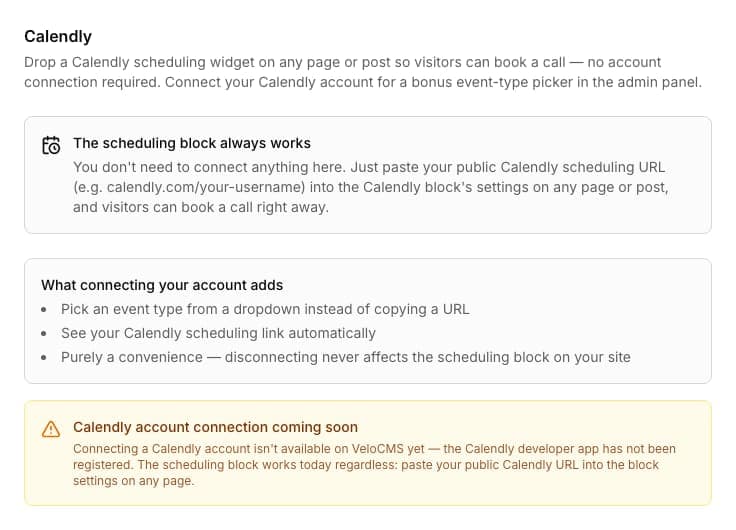
Connecting a Calendly account is not available yet. The plugin panel says so, and the optional event-type dropdown it would add does not exist today.
Every block needs its own pasted link. The plugin does not look up your event types for you.
Only calendly.com links are accepted. A link on any other address shows the placeholder note instead of a widget.
Bookings, availability and reminders happen inside Calendly. VeloCMS does not receive booking data and shows no bookings in your admin.
The widget loads Calendly's script from outside your site, so it needs the visitor's browser to reach Calendly.
Uninstalling the plugin stops the block from being offered for new pages. A block already placed on a page keeps rendering.
Frequently asked questions
Do I need to connect my Calendly account?
No. The block works from a pasted public link alone. The panel states plainly that the account connection is not available yet, and that the scheduling block works regardless.
Why can I not find the block in my page builder?
The block is offered only on sites that have installed this plugin. Install it from the marketplace and the Calendly Booking block appears in the palette.
What does a visitor see before the widget loads?
The page shows a bordered area at the height you set, so nothing jumps, and Calendly's script fills it in once the page is interactive. With no link entered, a short note tells editors what to add.
Can I put it on more than one page?
Yes. Add the block wherever you like, each with its own link. If one page holds several blocks, Calendly's script is still loaded only once.
Related plugins
Specifications
- Category
- Productivity
- Price
- Included
- Version
- 1.0.0
- Source
- First-party
Browse more integrations
58 free first-party integrations available.