How do I know my blog is ready to launch?
VeloCMS's Setup Assistant checks what separates a live blog from a ready one: content, SEO, domain, newsletter, and payments, never one collapsed score.
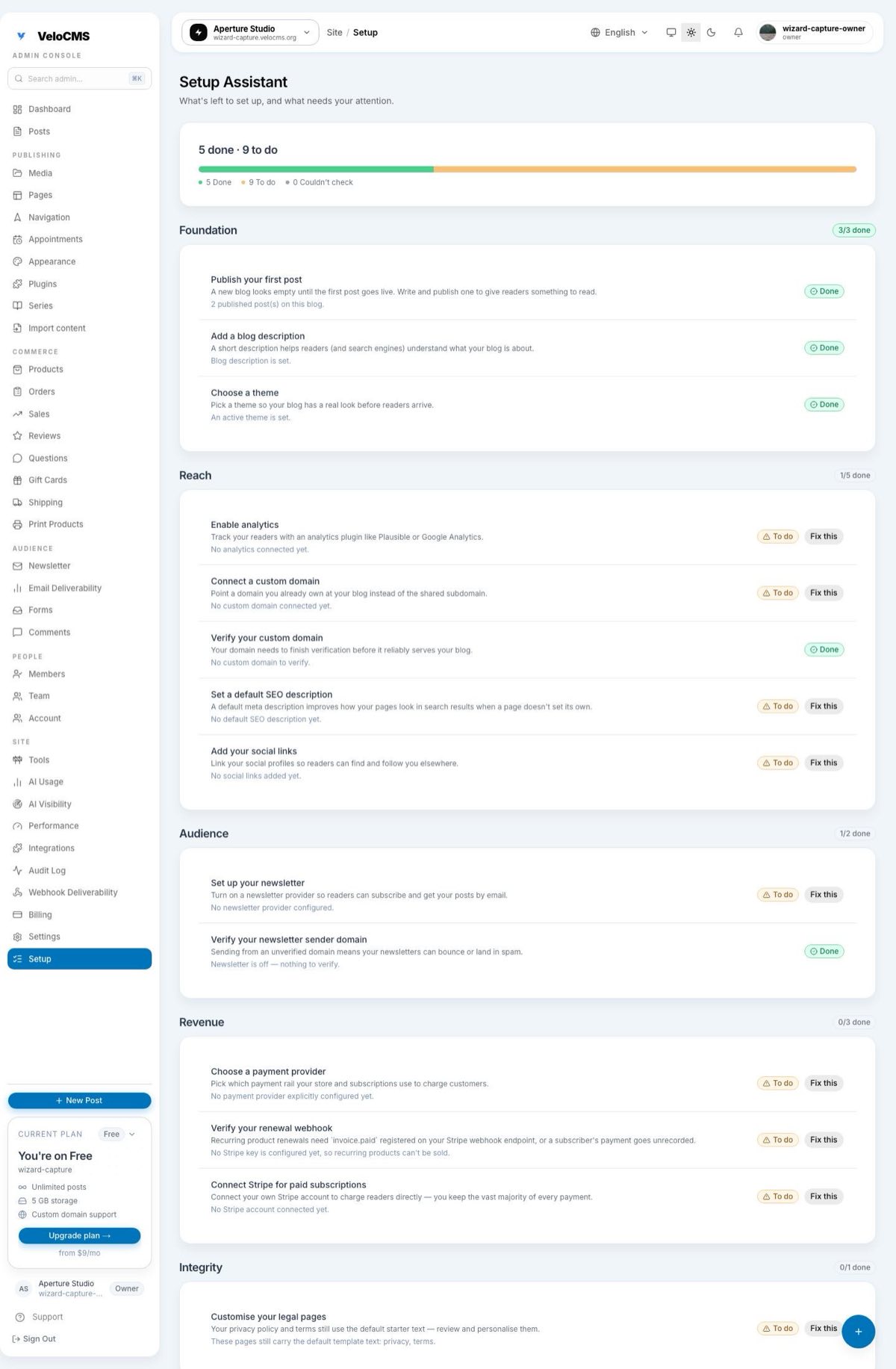
Technically, your blog is "live" the moment a post is published and the URL resolves. But live isn't the same as ready, and most of the gap is invisible until a reader bumps into it. VeloCMS's Setup Assistant, sitting permanently at /admin/setup, checks the dozen or so things that actually matter — a first post that's published, a domain that's verified rather than just typed in, a newsletter whose sender domain is confirmed rather than merely switched on — and it tells you honestly which are done, which need attention, and which it simply couldn't verify right now.
You don't notice an unverified sender domain until your newsletter batch lands in spam. You don't notice a custom domain stuck in "pending" over one bad DNS record until someone tells you your link doesn't work. The point of a launch-readiness surface is to catch exactly that class of problem before a reader does.
What does "ready to launch" actually mean?
It's less a ceremony and more a short list of things that are each easy to skip on your own. Some are content — a published post, an active theme, a real description instead of a placeholder. Some are discoverability — SEO defaults filled in, social links added, and, on plans that include it, a custom domain that's actually verified rather than just connected. Some are the plumbing readers never see until it breaks — a newsletter sender domain, a payment provider, whether your privacy and terms pages still carry the seeded default text from day one. None of these block you from publishing. Together, they're the difference between "I started a blog" and "my blog is set up the way I meant it to be."
Where do I find the launch-readiness checklist?
Open your admin dashboard and look at the sidebar. Setup Assistant has its own permanent page at /admin/setup, not a one-time banner that disappears the moment you close it. That's the deliberate change. The old onboarding checklist only showed up on first login and vanished forever once dismissed, which meant there was nowhere to go back three months later and ask "wait, is everything still okay?" after you'd switched newsletter providers or your SSL quietly lapsed. Setup Assistant re-checks everything live, every time you open the page.
At the top, instead of a collapsed percentage, you get three separate numbers: how many checks are passing, how many need your attention, and how many couldn't be verified this time around. That last bucket matters more than it sounds. A percentage that treats a database hiccup as a failure is lying to you about your own work; a page that says "we couldn't check this, try again" is telling you the truth about what it actually knows.
What does the Setup Assistant actually check?
The checks are grouped into five categories, and each one maps to something a reader would eventually notice if it stayed broken. Foundation covers the basics: a published first post, an active theme, a real blog description. Reach handles whether search engines and social previews have anything to work with — SEO defaults filled in, social links added, and, on plans with custom domains, whether yours is verified rather than just entered. Audience is your newsletter: a provider connected, and — the one that used to slip through unnoticed — a sender domain that's verified, not just switched on. Revenue checks whether a payment provider is explicitly configured if you've turned on commerce, whether your Stripe account is connected for memberships, and whether your member webhook endpoint is listening for the right subscription events. Integrity has one deliberately gentle check: whether your privacy and terms pages have actually been edited, or still carry the default text every blog starts with.
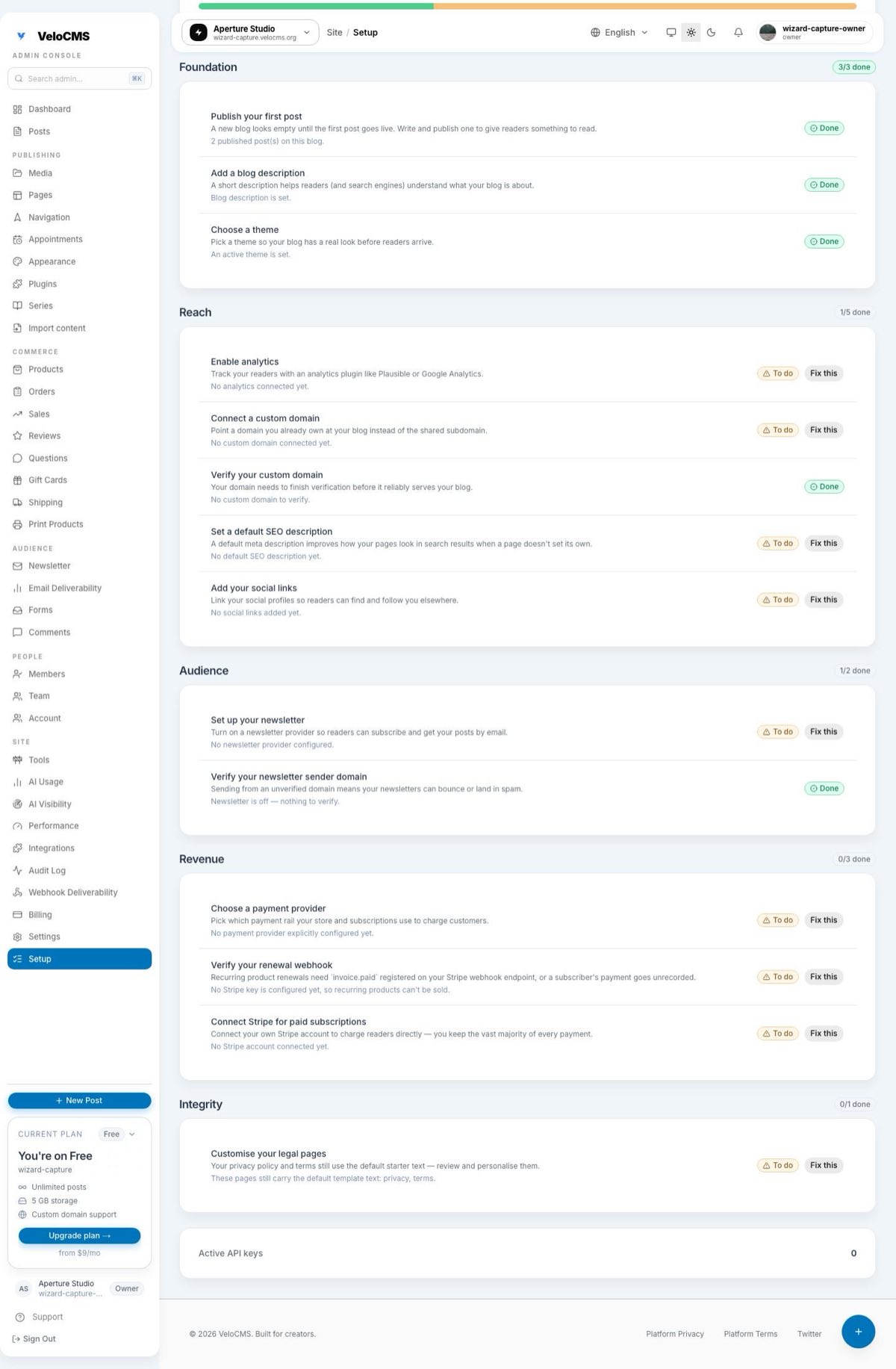
Two checks get flagged more urgently than the rest: a custom domain that's been added but never verified, and a newsletter provider that's switched on with a sender domain that hasn't been confirmed. Those are the pair that used to pass silently under the old checklist while quietly breaking real reader experiences. Everything else nudges you toward "materially better" — worth doing, never an emergency. The legal-pages check is graded optional on purpose, because every new blog starts with the same seeded privacy and terms text. If it colored the whole page red on day one, it would just be noise.
What does "unknown" mean?
It means exactly what it says: the assistant tried to read the signal it needed and couldn't get a clean answer, usually because of a momentary database hiccup. This is the detail that makes the page trustworthy rather than decorative. A checklist that quietly treats "I couldn't check" the same as "this failed" will tell a fully configured blog that it's done nothing at all — worse than useless, actively misleading. Setup Assistant keeps "unknown" as its own separate bucket, and if every check comes back unknown at once, the page says so plainly instead of showing a wall of red. Refresh a moment later and it usually resolves.
How do I actually fix something it flags?
Every check that needs attention comes with a "Fix this" link that goes to the real settings screen — the newsletter check links to newsletter settings, the domain check links to the domain setup screen, and so on. There's no dead end where the link dumps you on a generic page and leaves you hunting for the actual control. If you're working through the domain checks, our walkthrough on connecting a custom domain covers the DNS side in more detail than Setup Assistant's short summary needs to.
Work through the list category by category. Once every check that applies to your blog is passing, the page tells you so — plainly, with its own small celebration, not a vague "all good" you have to take on faith.
Do I need every check green before I launch?
Not necessarily — and this is where the checklist earns trust instead of nagging you. Custom-domain checks only show up if you're on a plan that includes one; if you're happily running on your velocms.org subdomain, they don't appear at all. Commerce and payment checks only apply once you've turned that module on. Setup Assistant is scoped to what your blog is actually trying to be, not a generic checklist written for a hypothetical tenant running every feature at once. A photography blog with no store enabled will never see a payment-provider check demanding attention, because there's nothing there to demand.
Ready, in the end, isn't a certificate you earn once. It's a page you can return to whenever something changes — a new plan, a new newsletter provider, six months of not thinking about your legal pages — and get an honest answer instead of a guess. If your blog is still finding its footing, or if you haven't started one yet, VeloCMS is available on a 14-day free trial, card required, no surprises — and Setup Assistant is there in your sidebar from the first login, quietly keeping score.