What it does
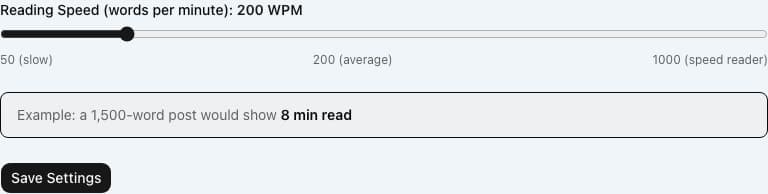
Every post on your site carries an estimated reading time that themes show in the byline and on post cards. Out of the box that estimate assumes 200 words per minute. Reading Time gives you one control: the reading speed, from 50 to 1000 words per minute. When you save a post, VeloCMS counts its words, divides by your speed, rounds up to a whole minute, and stores the result with the post. A short post never shows less than one minute. The settings panel includes a worked example, showing what a 1,500-word post would read at the speed you have chosen.
Who it's for
Publishers whose readers do not read at the textbook pace. A technical blog full of code and careful reading might choose a slower speed, while a news digest read quickly on phones might choose a faster one. It is a small tweak, best for people who care that the number in the byline feels honest to their own audience. If 200 words per minute is fine for you, you do not need it.
How it works
Install the plugin and open its settings. Drag the reading speed slider anywhere between 50 and 1000 words per minute. The slider moves in steps of 25.
Save the settings. The example under the slider shows the minutes a 1,500-word post would get at that speed.
From now on, whenever you create a post or save changes to a post's content, VeloCMS recounts the words and stores the new minutes figure with the post.
Your theme reads the stored figure and shows it, for example as a number of minutes to read, in the byline and on post lists.
Settings you configure
- Reading Speed (words per minute)
- A whole number from 50, a slow reader, to 1000, a speed reader, set with a slider that moves in steps of 25. The default is 200, the same speed VeloCMS uses when the plugin is not installed.
What it can access
The plugin reads the text of a post at the moment you save it, only to count the words, and stores one number, the minutes, on that post. It makes no network calls and reads no member, order or payment data. Its single setting, the reading speed, is saved with your site's plugin settings. Visitors are not tracked and nothing is sent to them beyond the figure your theme already prints.
Permissions
- Read your posts and pages
- Add sidebar widgets
Capabilities
content:readui:sidebar
Screenshots
Honest limits
A new speed applies to a post only when that post is next saved. Posts you saved earlier keep the figure they were given until you save them again.
The figure is a word count divided by your speed, rounded up. It does not allow for images or embedded media, and code is counted as ordinary words.
It is one speed for the whole site. You cannot set different speeds for different posts, categories or authors.
The plugin does not decide where the number appears or how it is worded. That is up to your theme.
If the setting cannot be read, or holds a value outside 50 to 1000, VeloCMS quietly uses 200 words per minute and the save still succeeds.
Frequently asked questions
Why do my older posts still show the old reading time?
The figure is worked out when a post is saved and then stored. Open an older post and save it again, and it picks up the speed you have set now.
Does it count the words in my headings and quotes?
Yes. It counts all the text in the post body, headings and quotes included. It does not count images or the post title.
What is the shortest time it can show?
One minute. Even a very short post is rounded up to a minute, never shown as zero.
Can I choose a speed that is not a multiple of 25?
Not from the slider, which moves in steps of 25. The plugin itself accepts any whole number from 50 to 1000, but the panel only offers the steps.
Related plugins
Specifications
- Category
- Content Tools
- Price
- Included
- Version
- 1.0.0
- Source
- First-party
Browse more integrations
58 free first-party integrations available.