How Do I Sell Event Tickets Directly From My Own Website?
Sell tickets on your own domain instead of handing your audience to Eventbrite. Tiers, capacity, and checkout live in your blog's existing dashboard.
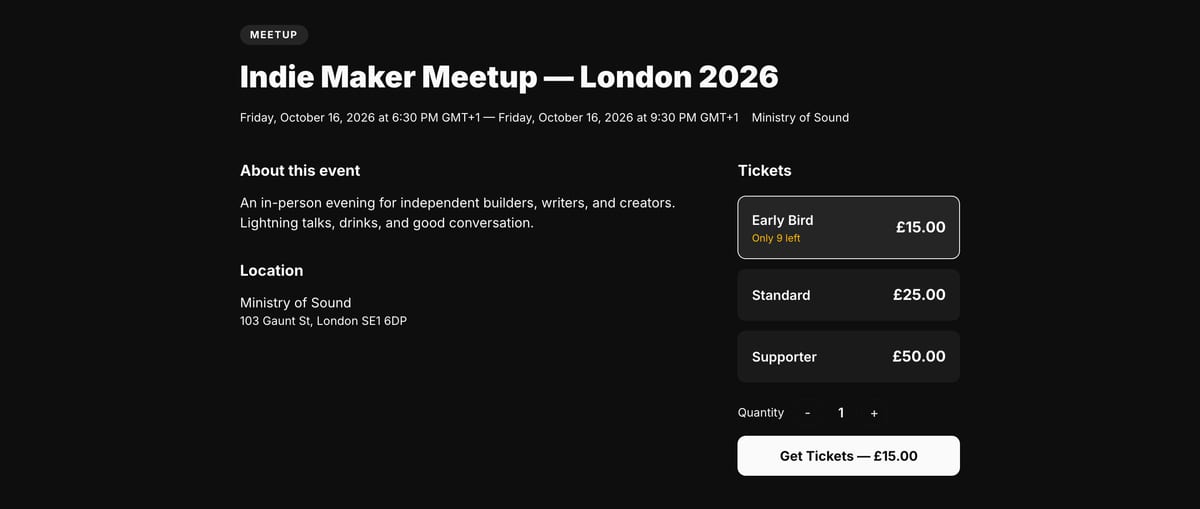
You can sell event tickets directly from your VeloCMS site without sending readers to a third-party platform. The new event ticketing feature lets you create ticket tiers, collect payments, and manage attendees inside the same dashboard you already use for your blog and storefront.
Selling event tickets usually means surrendering your audience to Eventbrite or another middleman, paying their fees, and hoping attendees remember your brand later. That never felt right for independent creators who already own a website and an audience. With VeloCMS, event tickets now live on the same domain as your blog, your shop, and your newsletter — one login, one checkout experience, one place where your business actually lives.
When you create an event, you build ticket tiers the same way you would build product variants. A general admission ticket at one price, an early-bird tier at another, maybe a VIP option with extras like priority seating or a meet-and-greet. Each tier gets its own stock count, so overselling a small venue becomes a non-issue. Readers browse the event page, pick the tier that fits them, and check out through the same Stripe flow that already powers memberships and physical products. The whole transaction happens under your brand, on your custom domain, with your own design wrapped around it.
What happens after someone buys a ticket?
The purchase lands in your orders dashboard alongside everything else you sell, and the buyer turns into a row on that event's attendee list with the details you actually need: name, email, ticket type, quantity. No separate login to a second platform, no exporting a CSV from somewhere else and reconciling it by hand, no wondering whether the payment cleared before you print the guest list. It is the same commerce engine you already use, just pointed at a date and a venue instead of a box you ship.
That single-dashboard part sounds like a small convenience until the week of the event, when it stops being one. Most independent organisers end up running a spreadsheet next to a ticketing platform next to their email list, and every one of those three has a slightly different idea of who is coming. Reconciling them is the actual work, and it always lands the night before. When the sale, the attendee record, and the customer relationship are the same object in the same database, that reconciliation job simply does not exist.
How do I check people in at the door?
Every registration carries its own check-in token, and your admin has a check-in view for each event. You open it on a phone at the door, scan or look people up, and the list updates as they arrive — so you can see at a glance how many of the people who paid have actually walked in. Because the tokens are random and single-purpose, a forwarded screenshot does not quietly become two admissions.
This is the part most creators underestimate when they first sell tickets. Taking the money is easy; knowing who is standing in front of you is what makes the evening run. A printed list works right up until someone is not on it, and then you are the person holding up a queue while you search an inbox on your phone.
Do I need a separate events plugin?
Not anymore. Event tickets are built into the core commerce layer. If your site already accepts payments, you can list an event in minutes without installing anything extra. The same tax settings, the same payout routing, and the same custom-domain checkout your readers already trust. You do not have to patch together another tool, sign another terms-of-service agreement, or train yourself on a new interface that looks nothing like the rest of your site.
This matters most when your events are part of a larger business rather than the whole of it. A photography educator running workshops, a podcaster hosting live shows, a restaurant doing ticketed tastings, or an indie maker running a small conference. For every one of them the event is a chapter in something longer — the workshop attendee is next year's course buyer, the tasting guest is a regular, the conference ticket is the start of a mailing list. Hand that first transaction to a marketplace and you get the money but not the thread. The buyer's email belongs to the platform, the follow-up gets sent by the platform, and the next time you have something to announce you are renting access to people you already met. Selling on your own domain keeps the thread in your hands: same customer record, same list, same site they will come back to. The attendee is your customer, not the platform's.
How do I get started?
Open your VeloCMS admin, head to the commerce section, and create a new event. Set the date, location, and ticket tiers, then publish the page. Your existing audience can buy without leaving your domain, and you can manage everything from the dashboard you already know. If you are not on VeloCMS yet, start a 14-day free trial and publish your first event this week.