What it does
This plugin hands your print-on-demand orders to Printful so you do not have to retype them. When a customer pays for an order that includes a physical item, the plugin creates a matching order in your Printful store, using the shipping name and address from checkout. The order is submitted for production straight away, so Printful charges the payment method on your Printful account. The VeloCMS order ID goes to Printful as its external ID, so a repeated notification never creates a second order. You tell it which VeloCMS product matches which Printful variant in a small mapping, and only mapped items are sent. The order page then shows that it was sent, with Printful's order ID and the time.
Who it's for
Store owners who sell custom merch such as shirts, mugs or posters and already have products set up in Printful. You should be comfortable looking up a sync variant ID in your Printful dashboard and pasting it into a short JSON mapping. If you want products pulled in from Printful automatically, this plugin does not do that yet.
How it works
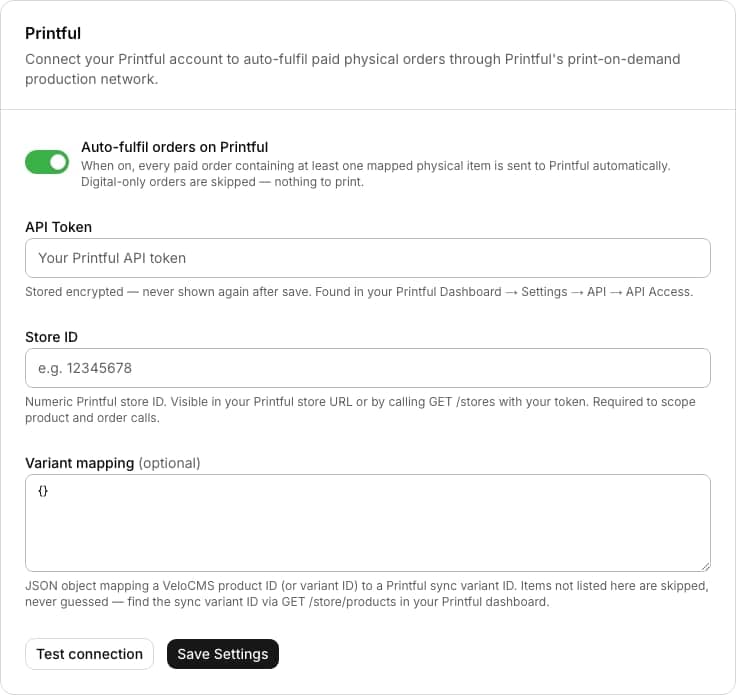
You paste your Printful API token and numeric Store ID into the plugin settings, then press Test connection. The token is stored encrypted.
In Variant mapping, you list each VeloCMS product ID (or variant ID) next to its Printful sync variant ID. Items you leave out are skipped, never guessed.
A customer pays for an order that has at least one physical item. Digital-only orders are skipped, since there is nothing to print.
The plugin sends the mapped items and the shipping address to Printful as a new order and confirms it for production at once, which bills your Printful account. The order page shows Printful with its order ID.
Settings you configure
- Auto-fulfil orders on Printful
- On by default. When on, every paid order with at least one mapped physical item is sent to Printful and confirmed for production, and Printful charges your account.
- API Token
- From your Printful Dashboard under Settings, API, API Access. Stored encrypted and never shown again after you save.
- Store ID
- The numeric Printful store ID. It is needed to scope product and order calls to your store.
- Variant mapping
- Optional JSON object linking a VeloCMS product ID or variant ID to a Printful sync variant ID. Items not listed are skipped.
- Test connection
- Checks that Printful accepts the saved token.
What it can access
After a paid order, the plugin reads the order ID, the shipping name, address and phone, the customer's email and the items you ordered. It does not read your posts or members. It sends those details to api.printful.com and nowhere else. Your Printful API token is stored encrypted and is never shown back to you in plain text.
Permissions
- Record Printful fulfilment status on your orders
- Read order data after a paid purchase
- Make network calls to api.printful.com
- Store your Printful API token encrypted
- Read your chosen Printful store ID
External network access
This plugin makes requests to the following domains:
api.printful.com
Capabilities
commerce:readcommerce:writenetwork:fetchui:settingsafterOrderCreate
Screenshots
Honest limits
Orders are confirmed on arrival, not left as drafts, so there is no review step before Printful bills your account. Turn the setting off to stop sending.
There is no product import. The plugin does not pull your Printful catalog into VeloCMS. You create products in your store yourself and link them with the variant mapping.
The variant mapping is JSON you write by hand with Printful sync variant IDs. Items missing from it are skipped. If none of an order's items are mapped, nothing is sent.
An order with an incomplete shipping address is skipped and logged, not sent.
Shipping rates and shipment tracking are not fetched from Printful. Status changes you make in Printful are not pulled back into VeloCMS.
If Printful rejects a request or cannot be reached, the sale still goes through. The failure is logged and recorded in the connector activity, and it is not retried automatically.
Only orders placed after you connect are sent. Earlier orders are not sent retroactively.
Frequently asked questions
Does it import my Printful products?
No. You create the products in VeloCMS and map each one to a Printful sync variant ID. The plugin only sends orders to Printful.
What happens with digital products in the same cart?
Only mapped physical items go to Printful. Digital items are ignored, and an order with only digital items is skipped completely.
Will a repeated notification create a duplicate order?
No. The plugin records the Printful order against your order, and it also sends your VeloCMS order ID as Printful's external ID, which Printful treats as unique.
Where do I see that an order was sent?
On the order detail page, under Fulfillment providers. It lists Printful, the Printful order ID and when it was sent.
Related plugins
Specifications
- Category
- Commerce
- Price
- Included
- Version
- 1.0.0
- Source
- First-party
Browse more integrations
58 free first-party integrations available.