Recent Sales Counter
A truthful 'sold in the last 7 days' line, counted from real paid orders
What it does
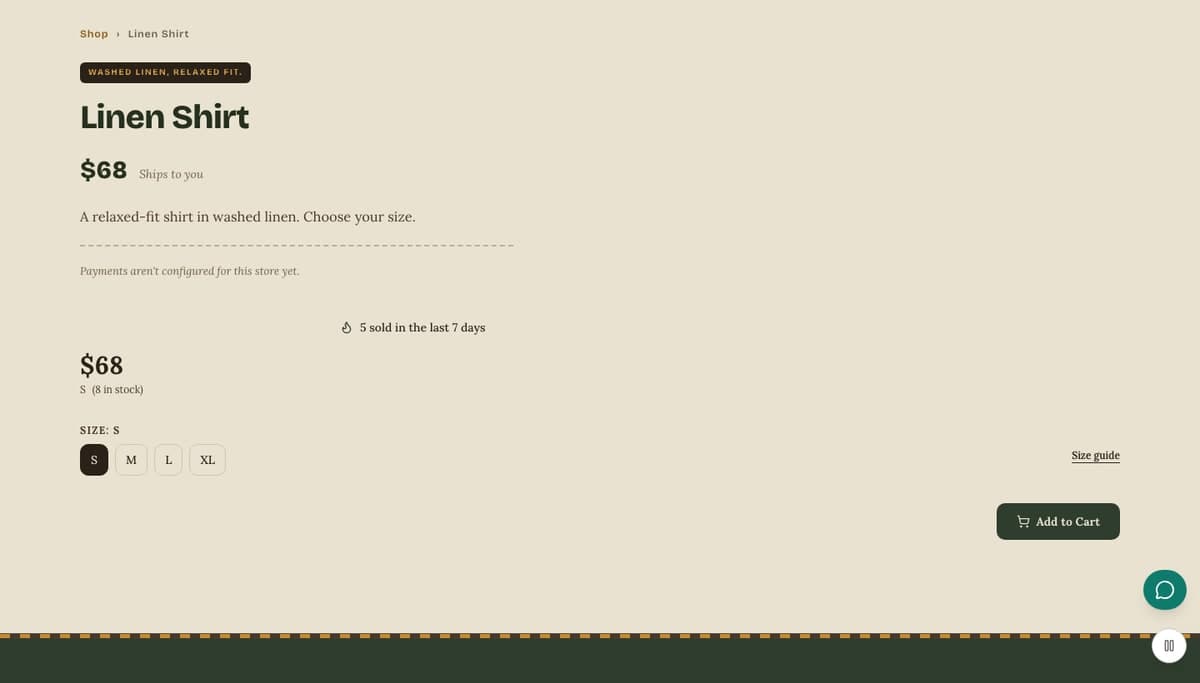
Recent Sales Counter adds one short line to a product page, for example "5 sold in the last 7 days". The number is counted from your own orders: it adds up the units of that product, across all of its variants, in orders that are paid. Pending, canceled and refunded orders are left out. You choose the time window, 24 hours, 7 days or 30 days, and a threshold between 1 and 50. If the real count is below the threshold, the line is not shown at all, so a new or slow product never displays a zero or a weak figure. Nothing is estimated, rounded up or invented. For a store the plugin is already switched on.
Who it's for
Store owners who want gentle social proof without risking their customers' trust. It suits shops with steady sales, where a small true number reassures a first-time visitor, and owners who dislike fake "someone just bought this" pop-ups. It is not for a brand-new store with no sales yet, because the line stays hidden until the real count reaches your threshold, which is the whole point.
How it works
Make sure the plugin is on. For a store it is on from the start, and it only turns off if you switch it off. Open its settings to change the defaults.
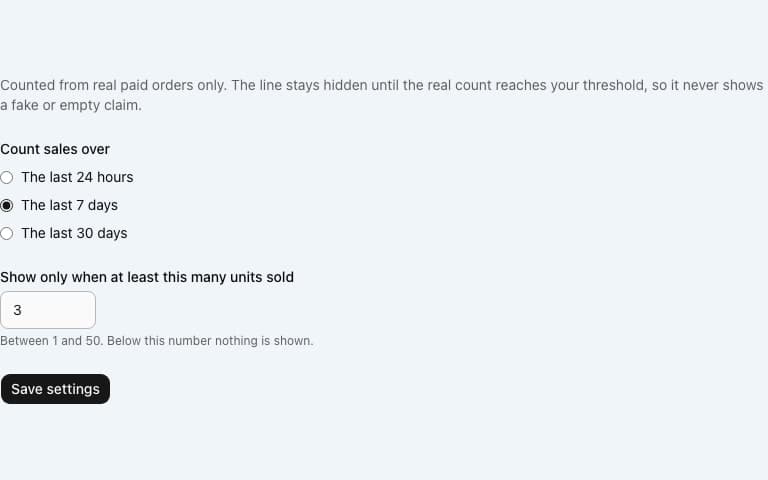
Choose the window (the last 24 hours, 7 days or 30 days) and the smallest number of units worth showing, then save. The starting values are 7 days and 3 units.
When a shopper opens a product page, the page adds up the units of that product sold in paid orders inside your window.
If the total is at or above your threshold, the line appears on the product page in the shopper's language. If it is lower, or if the orders cannot be read, nothing is shown.
Settings you configure
- Count sales over
- The last 24 hours, the last 7 days or the last 30 days. The default is 7 days.
- Show only when at least this many units sold
- A whole number from 1 to 50, with a default of 3. Below it, nothing is shown.
What it can access
The plugin reads the orders and order items of your own store to count units sold. It does not contact any outside service, adds no script to your pages and collects nothing about your shoppers. Only the final number appears on the page, never an order, a customer name or an email address. It needs no account, no key and no setup beyond the two settings.
Permissions
- Read products and orders
- Add settings sections
Capabilities
commerce:readui:settings
Screenshots
Honest limits
It counts units of one product, not orders. A single order of two shirts counts as two.
Only orders with the status processing or completed count. Pending, canceled and refunded orders do not, so a refund lowers the count once the figure refreshes.
The figure is cached for ten minutes on the server, so a very recent sale can take a few minutes to show.
It works on product pages only. It does not appear on listing pages, in the cart or on blog posts.
You cannot type in a number or round it up. If the real count is below your threshold, the line stays hidden by design.
Frequently asked questions
Can I show a number even when sales are low?
No. The line only appears once the real count reaches the threshold you set, and the lowest threshold is 1. That rule is what keeps the line honest.
Does it count orders that were never paid?
No. Only orders that are paid (processing or completed) are counted. Pending, canceled and refunded orders are ignored.
Are all variants of a product added together?
Yes. Sales of every size and colour of the product are added into one figure for that product's page.
Why is the line missing on a product I know has sold?
The sales may be older than your window, below your threshold, or not yet paid. The figure also refreshes only every ten minutes.
Related plugins
Specifications
- Category
- Commerce
- Price
- Included
- Version
- 1.0.0
- Source
- First-party
Browse more integrations
58 free first-party integrations available.