Sticky Add to Cart
A bottom bar that keeps the buy button in reach after the shopper scrolls
What it does
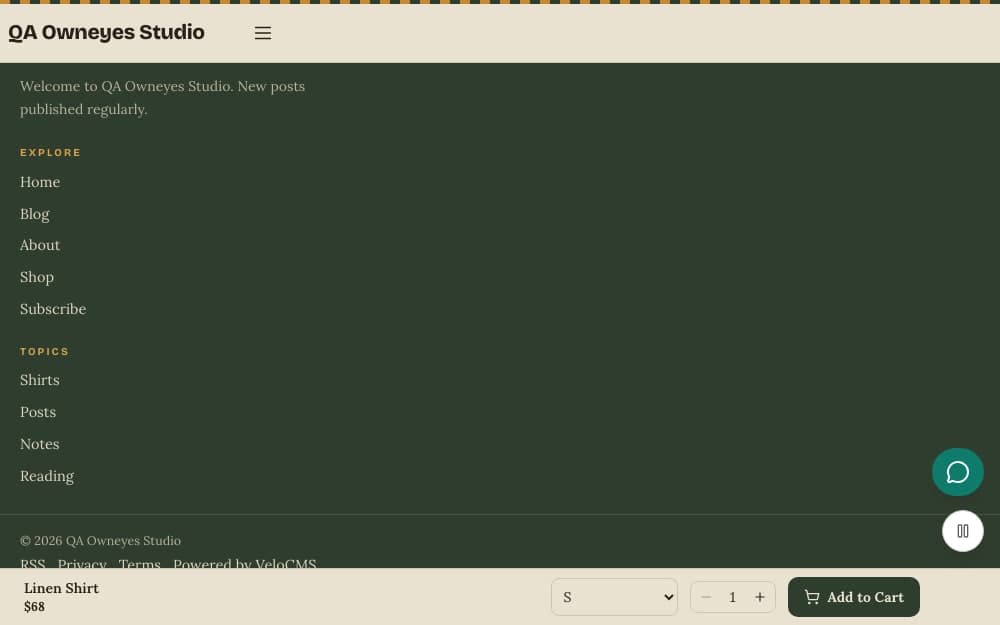
Sticky Add to Cart keeps the buy button within reach on a long product page. While the main add-to-cart button is on screen, nothing changes. Once the shopper scrolls past it, a slim bar slides in at the bottom with the product name, the current price and the struck-through old price when there is one, an option picker for products with variants, a quantity stepper, and the add button. It uses the same cart as the main button, so nothing is added twice or lost. The bar takes the fonts and colours of your theme, and it slides away again when the main button returns to view.
Who it's for
Shops whose product pages are long, with big photos, descriptions, size tables and reviews, where the buy button disappears early. It also helps shoppers on a phone, who scroll a lot and should not have to scroll all the way back up to buy. It suits any store that wants fewer abandoned product pages.
How it works
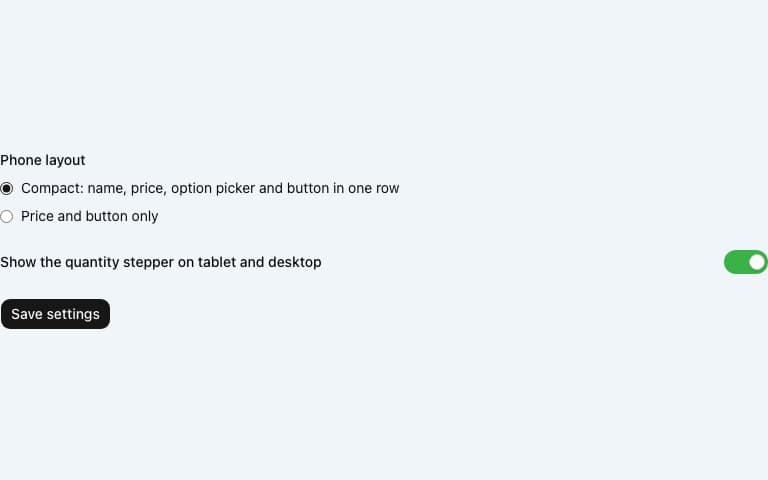
Make sure the plugin is on. For a store it is on from the start. Open its settings to change the phone layout or hide the quantity stepper.
A shopper opens a product page. The bar stays out of sight while the main add-to-cart button is visible.
When the shopper scrolls so that the main button is above the top of the screen, the bar slides in at the bottom. It hides again as soon as the main button is back in view.
From the bar the shopper picks an option if the product has variants, sets a quantity and adds the product to the same cart as the main button.
Settings you configure
- Phone layout
- Compact keeps the name, price, option picker and button together in the bar. Price and button only keeps the bar to the price and the add button; if an option is still needed, the button scrolls the shopper back up to the option picker.
- Show the quantity stepper on tablet and desktop
- On by default. Switch it off to show only the add button on screens from tablet width up. On a phone the stepper is never shown.
What it can access
The bar reads the product that is already on the page: its name, price, image, options and stock. It does not call any outside service and needs no key. When a shopper adds an item from the bar, it takes the same route as the main button, so any marketing pixels you have set up record the same add-to-cart event.
Permissions
- Read products and orders
- Add settings sections
Capabilities
commerce:readui:settings
Screenshots
Honest limits
It appears on product pages only, and only after the main add-to-cart button has scrolled up out of view. A shopper who never scrolls past the button never sees it.
The quantity stepper is capped at 10 per add, and at the stock left when the selected option has a finite stock. It is hidden on phones.
The Atelier theme has its own sticky buy button on its product page, so the bar is not shown there, to avoid two bars.
You cannot change its colours or text inside the plugin. It follows your theme, and its labels come from the site language.
The bar is not hidden when the footer comes into view. Instead it reserves its own height at the end of the page, so the footer's last lines stay readable above it.
Frequently asked questions
Does it work on phones?
Yes. On a phone you choose between two layouts in the settings: compact, with the option picker in the bar, or price and button only. The quantity stepper is not shown on phones.
Will it cover my WhatsApp button?
No. When the WhatsApp Chat button is on, it lifts clear of the bar by the bar's measured height while the bar is showing.
What does the bar show for a sold-out product?
The add button reads Out of stock and is disabled. On a product with options that has none chosen, the button asks the shopper to select an option first.
Does adding from the bar count in my analytics?
Yes. The bar sends the same add-to-cart event as the main button to the pixels you have set up, such as Meta or TikTok.
Related plugins
Specifications
- Category
- Commerce
- Price
- Included
- Version
- 1.0.0
- Source
- First-party
Browse more integrations
58 free first-party integrations available.