What it does
When someone shares one of your posts in a social feed or a chat app, the link preview needs a picture. This plugin makes one for every published post, so you never open a design tool. It draws a 1200 by 630 pixel card on a dark gradient with a soft purple glow, or on a solid purple fill if you prefer. The post title sits in large type in the middle, your blog name sits underneath it, the post's first tag appears as a small uppercase chip in the top-left corner, and a quiet Powered by VeloCMS mark sits bottom right. You can switch the chip and the blog name off. The card is drawn from the live post when a platform or crawler asks for it, then cached, so a post has a preview the moment it is published.
Who it's for
Writers and small teams who publish often and never get round to making a share image for each post. It suits blogs whose posts have strong titles, since the title is nearly the whole design, and sites where a consistent look across shared links matters more than a hand-made picture per article. If you already craft a cover image for every post and want that picture to be what people see, this plugin is not for you, because the generated card takes priority over the cover.
How it works
Install and enable the plugin from the marketplace. It works at once with its defaults, and you can change the card later in the plugin settings.
When a published post page is built, VeloCMS checks that the plugin is enabled for your site. If it is, the page's og:image points at your site's /api/og address for that post's slug, ahead of the cover image, the site logo and the platform default.
A platform or crawler requests that address. The card is drawn on the server from the post's title, first tag and your blog name, following the options you saved, returned as a PNG, and cached at the CDN for 24 hours, with a stale copy served for a further 12 hours while it refreshes.
Someone shares the link and sees the card. If the post cannot be found or is not published, a plain fallback card with your blog name is returned instead, on a short cache of one minute so it corrects itself soon after.
Settings you configure
- Background style
- Dark gradient is the default: a dark fade with a soft purple glow. Solid accent is a flat purple fill, with a lighter chip and lighter text. Save, then press Refresh on the sample card to see the change.
- Show tag chip
- On by default. Shows the post's first tag as a small badge in the top-left corner. Turn it off and that corner stays empty.
- Show blog name
- On by default. Adds your blog name as a line under the post title. Turn it off and the title stands alone.
What it can access
The plugin reads each post's title and first tag, plus your blog name and your saved card options, so it can draw the card. It makes no calls to outside services and sends nothing to a third party. Its only output is an image served from your own site, and a changed og:image address on your post pages. It adds a settings section to the admin area, which includes a live sample card you can refresh.
Permissions
- Read your posts and pages
- Add settings sections
Capabilities
content:readui:settings
Screenshots
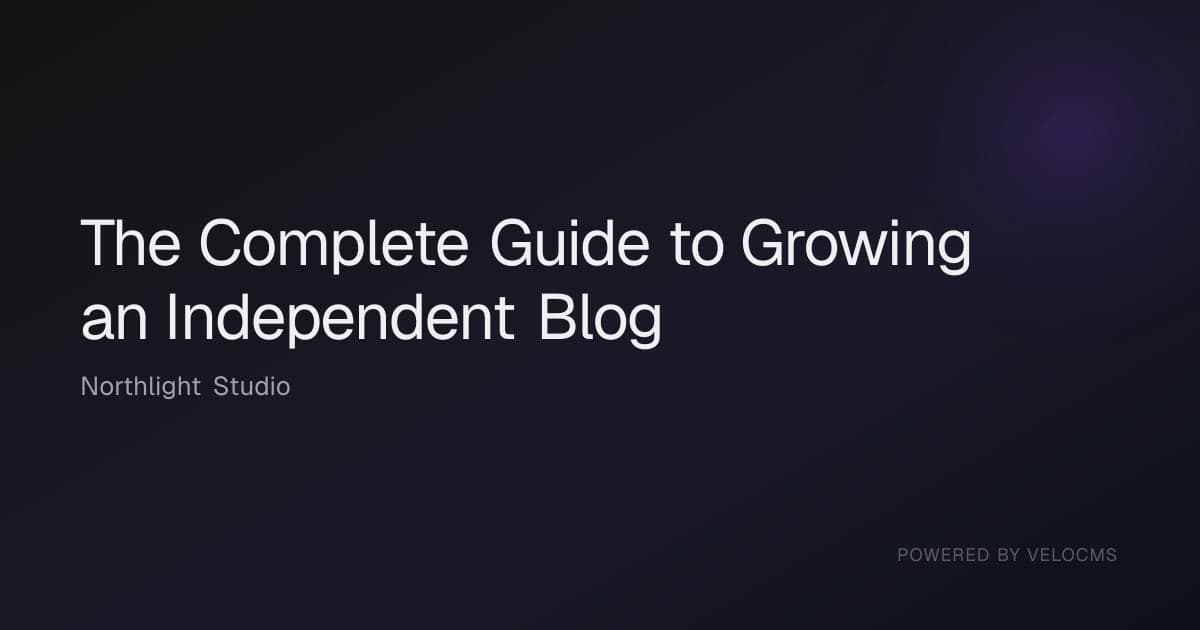
Honest limits
The layout is fixed: large title, optional blog name, optional first-tag chip and the Powered by VeloCMS mark. You can pick a gradient or solid background and hide the chip or the blog name, but you cannot upload a logo, pick fonts or colours, or change the design per post.
Only the first tag of a post is shown, cut to 30 characters, and titles are cut to 80 characters with an ellipsis. Very long titles are set in a smaller size before they are cut.
The generated card takes priority over a post's own cover image for social previews. Turn the plugin off if you want covers back as the share picture.
Cards are cached at the CDN for 24 hours, so a changed title, tag or card setting can take up to a day to reach crawlers and show in a fresh preview. Platforms such as Facebook and LinkedIn also keep their own copy until you ask them to re-scrape the link.
It applies to blog post pages only. Pages, products and the home page keep whatever share image they already use.
Frequently asked questions
Do I need to design anything or upload an image per post?
No. The card is drawn automatically from the post's title, first tag and your blog name. Nothing is uploaded.
Can I still use a cover image on the post itself?
Yes. The cover still shows on your post page. The plugin only changes which picture is offered to social platforms. While it is on, the generated card is offered instead of the cover.
What happens to a draft post?
Only published posts get a real card. Asking for a draft or an unknown slug returns the plain fallback card showing your blog name.
How can I see what the card looks like?
Open the plugin's settings in the admin area. A sample card is drawn there from your saved options and a refresh button redraws it. Your live card for a post is at your site's /api/og address with that post's slug.
Can I change how the card looks?
In three ways: choose a dark gradient or a solid background, show or hide the first-tag chip, and show or hide your blog name. The layout, fonts and colours are fixed.
Related plugins
Specifications
- Category
- seo
- Price
- Included
- Version
- 1.0.0
- Source
- First-party
Browse more integrations
57 free first-party integrations available.