Google Tag Manager
Your Tag Manager container on every public page, gated by consent in the EU and UK
What it does
Paste the ID of a Google Tag Manager web container and this plugin places it in the head of every public page on your blog. Before anything else runs, the page queues Google Consent Mode v2 with four signals set to denied: ad storage, analytics storage, ad user data and ad personalization. Queuing those defaults makes no request and writes no cookie. The container script, gtm.js, is fetched from www.googletagmanager.com only once consent is settled. At that moment the plugin also flips all four signals to granted, so the tags you built in Tag Manager can fire. Because a container can hold any tag you add later, VeloCMS treats it as cookie-setting in every case and turns on its consent banner whenever the plugin is enabled with a valid container ID.
Who it's for
Site owners who already organise their tracking inside a Google Tag Manager workspace and want those tags on a VeloCMS blog without touching templates. It fits best when the tags in your container only need scripts the site's security policy already allows, so read the limits below before you rely on a third-party tag. If all you want is GA4 page views, the dedicated Google Analytics plugin asks for less setup and gives the same consent handling.
How it works
Open the plugin settings, type your Container ID and save. The form only accepts GTM- followed by letters and digits, and stores the ID in uppercase.
Each public page gets a head snippet that sets the four Consent Mode v2 signals to denied. At this point nothing is downloaded and no cookie is created.
Readers in the EU, the EEA or the UK, and readers whose country is not reported, see the cookie banner. Accept All loads gtm.js and switches the signals to granted. Reject All leaves the container unloaded.
Readers whose country is reported as outside those regions get no banner, and the container loads once the page has started up in their browser.
A returning reader who accepted on an earlier visit has the container start straight from the server-rendered page, without waiting for the banner code.
Settings you configure
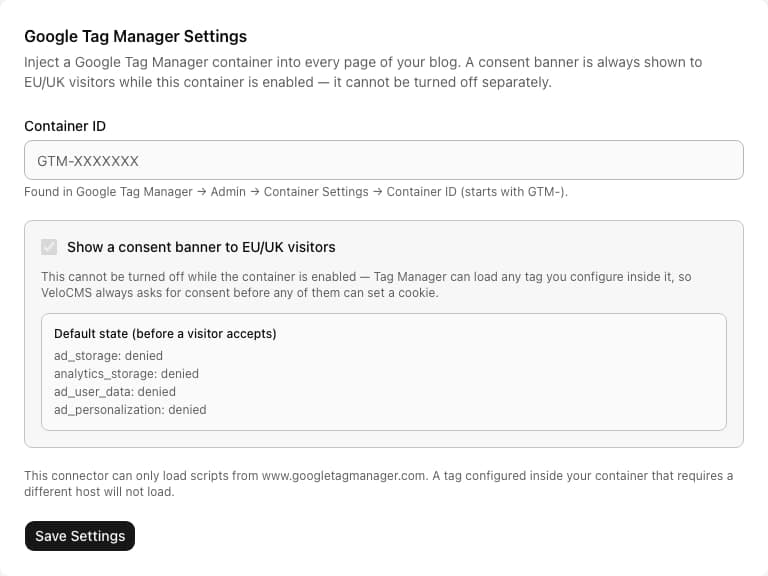
- Container ID
- Found in Tag Manager under Admin, Container Settings. It begins with GTM-. A saved ID that fails the format check adds nothing to your pages.
- Show a consent banner to EU/UK visitors
- Displayed ticked and greyed out. It cannot be unticked while the container is enabled, because the container may load tags that set cookies.
- Default state (before a visitor accepts)
- A read-only preview listing ad_storage, analytics_storage, ad_user_data and ad_personalization, each set to denied.
What it can access
The plugin does not read posts, members, orders or any other site content. It keeps only your Container ID, stored as plain text since that ID is public in your page source anyway. In visitors' browsers it loads gtm.js from www.googletagmanager.com. Whatever the tags inside your container collect goes to the vendors you set up in Tag Manager, under their terms, not to VeloCMS.
Permissions
- Inject a Google Tag Manager container on all pages
- Load tags only from www.googletagmanager.com — tags requiring other hosts will not load
- Always show a consent banner to EU/UK visitors while the container is enabled (cannot be turned off)
External network access
This plugin makes requests to the following domains:
www.googletagmanager.com
Capabilities
network:fetchui:settings
Screenshots
Honest limits
The site's content security policy is not widened for this plugin. A tag that pulls a script from a domain the policy does not already allow is blocked by the browser, and VeloCMS shows no error for it.
The consent banner cannot be disabled while the container is on, and it has only Accept All and Reject All. Accepting grants all four Consent Mode signals together.
Only the script form of the container is added. The noscript iframe fallback is left out, so readers with JavaScript turned off are invisible to your tags.
Whether a reader is asked depends on the country Cloudflare reports. Everyone outside the EU, EEA and UK gets the container without a prompt.
One container per site. Tags, triggers and variables are all managed in Tag Manager, not in VeloCMS.
The plugin does not make your site compliant with GDPR or any other law. Your privacy policy and consent duties stay with you.
Frequently asked questions
Why can't I turn the consent banner off?
A container can load any tag you add in future, so VeloCMS has no way to know which ones set cookies. It therefore asks EU, EEA and UK readers whenever a valid container is active.
Will a tag that uses another vendor's script work?
Only if that vendor's domain is already allowed by the site's security policy. The plugin adds no new hosts, so tags that need other domains can fail silently.
What happens before a reader makes a choice?
Only the denied defaults are queued. For a reader who is shown the banner, gtm.js is not requested and the plugin sets no cookie until Accept All is pressed.
Can I run this alongside the Google Analytics plugin?
Yes, each adds its own snippet and both sit behind the same banner. If your container already holds a GA4 tag, enabling both gives every page two separate GA4 setups, so most sites pick one route.
Related plugins
Specifications
- Category
- Analytics
- Price
- Included
- Version
- 1.0.0
- Source
- First-party
Browse more integrations
58 free first-party integrations available.