PostHog
PostHog on every public page from one project key, held back until consent where required
What it does
The plugin adds PostHog's standard JavaScript loader to the public pages of your blog. You give it your PostHog project key, which begins with phc_, and pick the region your project lives in, United States or European Union. When a page loads, the loader fetches PostHog's script bundle from that region's asset host and starts PostHog with your key. PostHog's script then records activity on the page and sends it to your project. The plugin sets one extra option, person_profiles to identified_only, and never identifies anyone itself. A visitor whose consent is required gets nothing from PostHog until they accept the cookie banner. Charts, recordings and flags are all read and managed inside PostHog, not in VeloCMS.
Who it's for
Bloggers, publishers and small product teams who already use PostHog, or want to, and would like their VeloCMS site to report into the same project as the rest of their product. It suits people who care which region their analytics data is stored in, since the EU host is one click away. If you only need simple traffic counts without cookies, Plausible or Fathom will be lighter.
How it works
In PostHog, open Project Settings and copy the Project API Key. It is a public key meant for browsers, so it is safe to place on your pages.
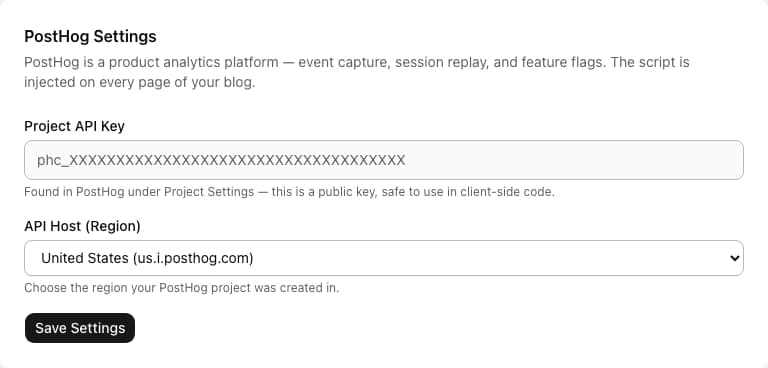
Paste the key into the plugin, choose the US or EU region and save. The form checks that the key starts with phc_ and has the expected length.
On each public page, VeloCMS reads your saved key, checks its format again and adds the PostHog loader to the page head. A key in the wrong format adds nothing.
Visitors in the EU, Norway, Iceland, Liechtenstein or the UK, and anyone whose country is unknown, see a cookie banner. PostHog starts only after Accept.
Visitors from other countries see no banner, and PostHog starts once the page is running in their browser.
Settings you configure
- Project API Key
- Starts with phc_ followed by 20 to 64 letters or digits. It is stored encrypted and shown as dots after saving. The form will not accept the dots, so re-enter the key whenever you save again.
- API Host (Region)
- United States (us.i.posthog.com) or European Union (eu.i.posthog.com). Pick the region your PostHog project was created in. United States is preselected.
What it can access
The plugin reads none of your posts, members or orders, and it does not pass names or email addresses to PostHog. It needs only your project key and region. In the visitor's browser it loads PostHog's bundle from us-assets.i.posthog.com or eu-assets.i.posthog.com, and PostHog then sends what it records to us.i.posthog.com or eu.i.posthog.com. PostHog stores first-party cookies to recognise returning visitors and sessions.
Permissions
- Inject a PostHog analytics script on all pages
- Load and send tracking data to PostHog (us.i.posthog.com or eu.i.posthog.com)
External network access
This plugin makes requests to the following domains:
us.i.posthog.comeu.i.posthog.comus-assets.i.posthog.comeu-assets.i.posthog.com
Capabilities
network:fetchui:settings
Screenshots
Honest limits
Only the two PostHog cloud regions are offered. A self-hosted PostHog address or a reverse proxy cannot be entered, and any other host falls back to the US region.
There are no settings here for session replay, surveys, feature flags or custom events. The snippet passes only your key, the region and the identified-only profile option.
The banner offers Accept All and Reject All. Accepting also starts any other consent-gated tools on your site, such as Google Analytics or marketing pixels, with no per-tool choice.
The script is added to your public blog pages, not to the VeloCMS admin.
One PostHog project per site. VeloCMS does not show PostHog data in its own dashboard.
You remain responsible for your privacy policy and any legal duties around tracking. The plugin does not make a site compliant with any law.
Frequently asked questions
Is it safe to put the PostHog project key on public pages?
Yes. PostHog designs the project key for use in browsers, and the admin panel says the same. VeloCMS still keeps it encrypted at rest and masks it in the settings form.
Does PostHog run before a European visitor agrees?
No. For visitors in the EU, EEA and UK, and for anyone whose country cannot be determined, the page carries only a dormant loader. PostHog's script is fetched and started after Accept. Returning visitors who already accepted get it straight away.
Why does saving show an invalid key error after I change the region?
Once saved, the key is masked with dots, and the form checks the format of whatever is in the field. Paste your full phc_ key back in together with the new region, then save.
Will logged-in members show up by name in PostHog?
No. The plugin never calls PostHog's identify method and passes no member names, emails or account details to it.
Related plugins
Specifications
- Category
- Analytics
- Price
- Included
- Version
- 1.0.0
- Source
- First-party
Browse more integrations
58 free first-party integrations available.